YouTube, YouTube Music and Spotify

Your videos and music, without sideloading

Watch YouTube, listen to YouTube Music or choose your next Spotify track inside anyPWA. Get ad blocking and background playback in a native iPhone and iPad app you can install from the App Store.

  • Ad blocking included with your free saved website
  • Keep listening with the screen locked
  • Install from the App Store, with no signing or weekly refresh
Download on the App Store

One saved website is free, including ad blocking and playback features. Optional extras are one-time purchases.

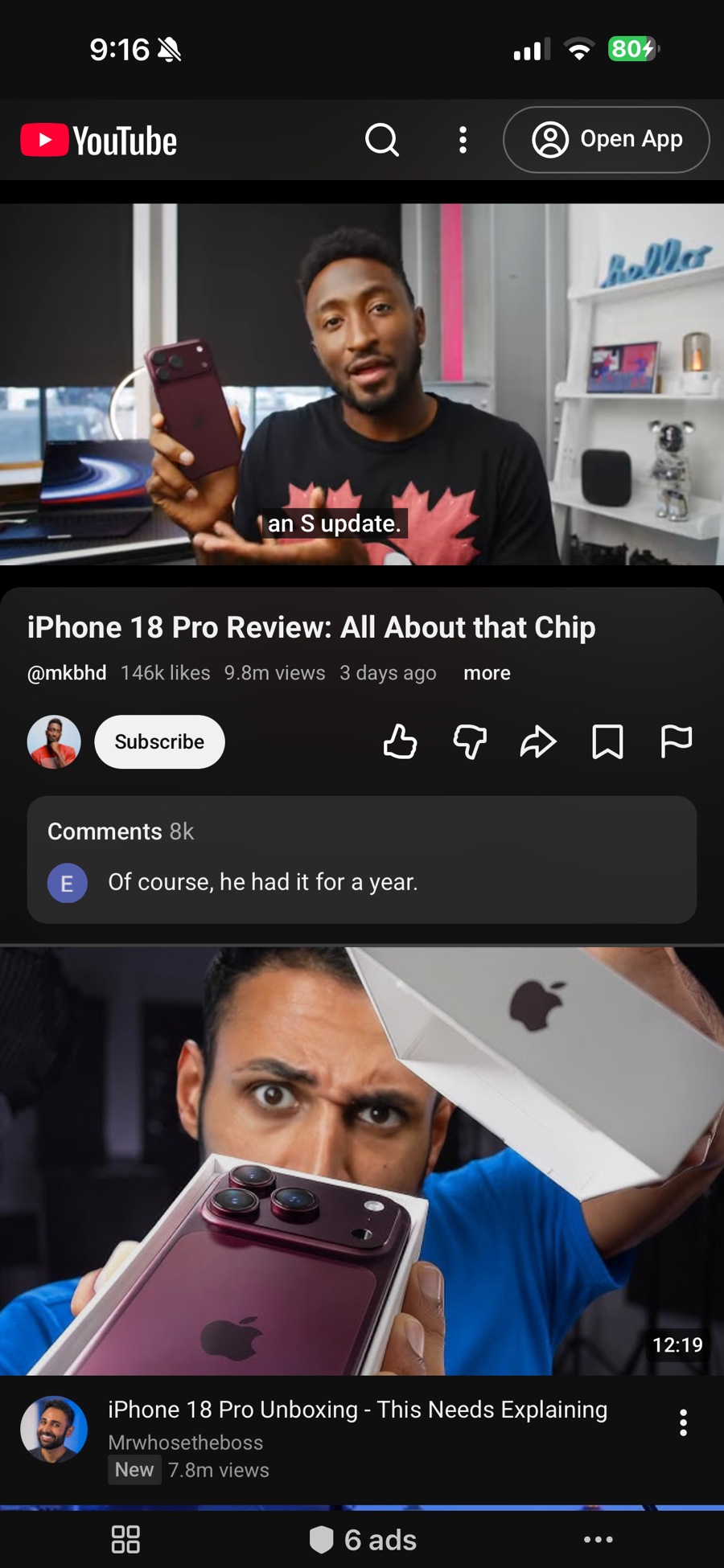
YouTube video playing fullscreen inside anyPWA on iPhone

Watch and listen

Choose what you want to play

Use your free saved website for the service you open most.

YouTube

Videos play without ads, with Picture in Picture and playback that continues after you lock the phone.

  • No video or audio ads
  • Picture in Picture
  • Keeps playing in the background and with the screen locked
  • Play and pause from the Lock Screen and Control Center
Set up YouTube

YouTube Music

Use the free YouTube Music web player with built-in audio ad blocking. Keep listening on your commute, with your phone locked or while you use another app.

  • No audio ads
  • Keeps playing in the background and with the screen locked
  • Play and pause from the Lock Screen and Control Center
  • A separate web app for your YouTube Music account
Set up YouTube Music

Spotify

The free Spotify web player, without the audio ads and with working track controls.

  • No audio ads
  • Next and previous track work, not only shuffle
  • Tap any track to play it
  • Keeps playing in the background and with the screen locked
  • Play and pause from the Lock Screen and Control Center
  • Also plays on Macs with Apple silicon
  • Browse whole albums
Set up Spotify

Getting started

From the App Store to your first video or song

Save a website once, then open it from your library or a Home Screen widget.

  1. Install anyPWA

    Get it from the App Store. Open it and allow the ad-blocking filters to download.

  2. Choose your website

    Tap +, then select YouTube, YouTube Music or Spotify from Examples. Leave Block ads on and tap Save.

  3. Start watching or listening

    Open your saved website and choose something to play. Sign in on the website to access your own library and playlists. Audio can keep playing when you switch apps or lock your screen.

An App Store option for everyday watching and listening

If you use AltStore, SideStore or Sideloadly for YouTube or Spotify, you can also access these services through their websites in anyPWA. Install anyPWA from the App Store, save a website and start playing. You do not need a developer account, a signing certificate or a computer to set it up.

anyPWA opens any website in its own fullscreen view. YouTube, YouTube Music and Spotify have dedicated ad-blocking and playback support, along with setup guides and demos so you can see how they work.

Make it yours with Media Controls

The optional Media Controls one-time purchase adds playback preferences for YouTube and YouTube Music. Choose audio-only playback for listening, set a preferred video quality, or use different settings on Wi-Fi and cellular. You can also switch to audio only when the app is in the background.

For YouTube, Media Controls also includes Hide Shorts to hide Shorts from feeds and navigation. Settings are saved separately for each website.

See the playback settings and audio-only demo.

Questions

Can I use YouTube and Spotify without sideloading?

Yes. Install anyPWA from the App Store and add YouTube, YouTube Music or Spotify from the built-in examples. You use the service’s website inside anyPWA, with ad blocking and playback support. Your first saved website is free.

Do I need to refresh or re-sign anyPWA every seven days?

No. You install and update anyPWA through the App Store. Using it does not require a sideloading certificate or a developer account.

Is anyPWA a PWA?

anyPWA is a native app built with SwiftUI and WebKit. It opens websites, including PWAs, in dedicated fullscreen views and adds ad blocking, background audio and Picture in Picture for compatible videos. You can launch saved websites from Home Screen widgets and keep separate sign-ins for each entry.

Can I use my existing accounts and playlists?

Sign in to the website with your existing Google or Spotify account to access your subscriptions, library and playlists. Each saved website keeps its own sign-in, separate from Safari and the services’ native apps.

Do I need a service subscription?

The features described here work with the services’ free web players. anyPWA does not include a YouTube Premium, YouTube Music Premium or Spotify Premium subscription.

Does playback need an internet connection?

Yes. Videos and music stream from the service’s website, including during background and audio-only playback.

Where can I get help setting it up?

The YouTube, YouTube Music and Spotify guides include setup screenshots and playback instructions. You can also contact anyPWA support.

Try your first website free

Ad blocking, background playback and Lock Screen controls are included with your free saved website. YouTube videos also support Picture in Picture.

Unlimited Websites is a one-time purchase for multiple saved websites and library rearranging. Media Controls is a separate one-time purchase for the additional YouTube and YouTube Music playback preferences and Hide Shorts for YouTube. Both purchases support Family Sharing. There is no anyPWA subscription.

Get anyPWA on the App Store